Showing posts with label software. Show all posts

Saturday, February 23, 2019

How to install UWP (Modern UI) apps on Windows 10 LTSC/LTSB

It is possible to install modern apps like Snip & Sketch and the new calculator on Windows 10 LTSC.

First, you'll need to enable the Developer Mode under Update & Security on the Settings app.
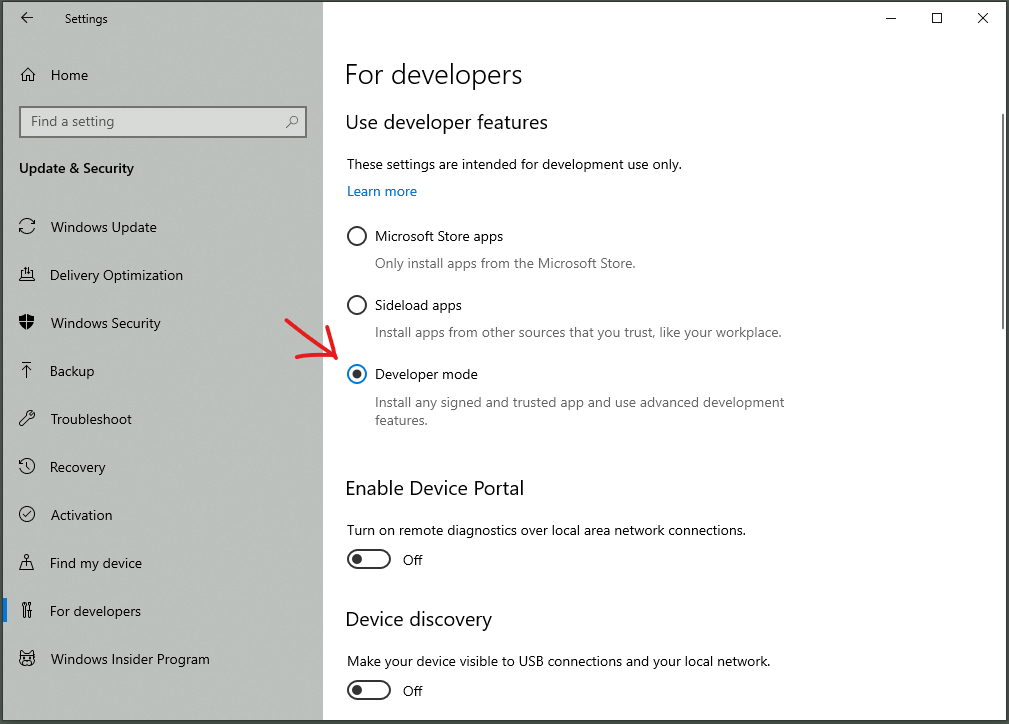
Enable Developer Mode

.appx and .appxbundle packages can now be installed from PowerShell. If you add the official App Installer first, you'll be able to double-click subsequent packages to install them with a GUI interface.

At the time of the writing of this post, https://store.rg-adguard.net/ is a working tool that you can use to download free Windows Store packages directly from Microsoft. Select the Retail ring to get stable packages.

Regardless of what tool you use, make sure that the files are being downloaded from microsoft.com servers. Avoid packages from random sources.

To install both the App Installer and Snip & Sketch, use the downloader to get the latest versions of these files:

from https://www.microsoft.com/p/app-installer/9nblggh4nns1: Microsoft.DesktopAppInstaller_2019.xxx.xxx.x_neutral_~_8wekyb3d8bbwe.AppxBundle Microsoft.DesktopAppInstaller_2019.xxx.xxx.x_neutral_~_8wekyb3d8bbwe.BlockMap Microsoft.DesktopAppInstaller_2019.xxx.xxx.x_neutral_~_8wekyb3d8bbwe.EappxBundle Microsoft.VCLibs.xxx.xx_xx.x.xxxxxx.x_x64__8wekyb3d8bbwe.Appx Microsoft.VCLibs.xxx.xx_xx.x.xxxxx.x_x64__8wekyb3d8bbwe.BlockMap Microsoft.VCLibs.xxx.xx.UWPDesktop_xx.x.xxxxx.x_x64__8wekyb3d8bbwe.Appx Microsoft.VCLibs.xxx.xx.UWPDesktop_xx.x.xxxxx.x_x64__8wekyb3d8bbwe.BlockMap from https://www.microsoft.com/p/snip-sketch/9mz95kl8mr0l: Microsoft.ScreenSketch_2018.xxxx.xxxx.x_neutral_~_8wekyb3d8bbwe.AppxBundle Microsoft.ScreenSketch_2018.xxxx.xxxx.x_neutral_~_8wekyb3d8bbwe.BlockMap Microsoft.ScreenSketch_2018.xxxx.xxxx.xx_neutral_~_8wekyb3d8bbwe.EAppxBundle

Save all of them in the same folder and run Add-AppxPackage to install the two VCLibs packages and the App Installer. Finally, you can click twice on the Snip & Sketch package to install it too.

Friday, April 10, 2015

Adobe Fireworks CS6 crashes when trying to use the align panel on Windows 10 Tech Preview build 10041

Fireworks CS6 was working normally for me on earlier Windows Tech Preview releases, but some time after I've upgraded it to build 10041, I found out that using the align panel makes it throw errors or stop working altogether. The most often displayed message was:

Fireworks unexpected exception: 80000004.

I've learned that the align panel extension is an SFW file that runs ActionScript functions. At first I thought that my problem could be then caused by some update of the Flash Player addon that comes bundled with Internet Explorer, but further research revealed that Fireworks and other older Adobe programs actually install and use their own embedded version of Flash, the authplay.dll file.

I'm still not sure if this issue has really been caused by some design change on Windows 10041 or some setting I've manually changed, but the only workaround I've found was to install an old version of the align panel. It took me a while to find it, but it's working.

Wednesday, January 28, 2015

How to block ads on the Vivaldi browser?

The new Vivaldi browser is still being developed by former Opera programmers, but you can already hide ads with it. Use the "Page actions" button next to the zoom bar, and select "Content blocker":

Vivaldi content blocker

Update: Vivaldi now allows you to install extensions directly from the Chrome Web Store. You can try the powerful adblocker uBlock Origin by clicking on "Add to Chrome".

Wednesday, May 2, 2012

HandyCache - Windows software proxy with graphical user interface

HandyCache Proxy

HandyCache is a caching proxy server software for Windows available in Russian, English and other languages. You can use it for free on your personal computer or small business network to share your connection with up to five users. It's a great alternative for Privoxy and Squid, because it has a completely graphical user interface that works on any modern Windows version, which means no confusing text files to edit or messing up with a command line.

I'm not personally involved with the developer of HandyCache, but I used to be a loyal user who have played with most options. After an extensive research, I haven't found any other graphical proxy software for any operating system with as many useful options as HandyCache.